Build 01 / AI Engineering Methodology
Tanya Build Cockpit
The AI engineering operating system behind pl8ypus builds. Tanya combines structured build packets, project memory, milestone gates, senior engineering guardrails, Claude red-team review, and a read-only cockpit view.
Greg's take
I spent years trying to write better software. Then I realised I was not fighting software at all. I was fighting entropy.
Every project starts with incomplete knowledge. Every sprint inherits decisions, shortcuts, and missing notes that somebody has to reconstruct later.
AI does not magically fix that. It exposes it, then moves fast enough for drift and unclear decisions to compound.
Tanya exists because the weak point was never the model. The weak point was the delivery system around the model. Tanya v5 adds the missing operating layer: loop state, milestone gates, senior guardrails, and review evidence before the next build moves forward.
Build milestones
Product maturity checkpoints.
Mission Control Foundation
Core build-state, memory, and mission framing are in place.
Supervised Handoff Bridge
Codex and review handoffs now follow a controlled packet flow.
Milestone Gate Automation
Gate closure and reporting have become repeatable build controls.
Tanya v5 Loop View
The cockpit now exposes loop state and progress in a readable operator view.
Senior Engineering Layer
The next layer adds stronger architecture review and delivery guardrails.
Supervised Autonomous Build Loop
Autonomy only expands once human approval and stop conditions are proven.
The problem
AI-assisted builds drift when the process is weaker than the model.
Context disappears between sessions
AI sessions start cold unless the current state, decisions, constraints, and known risks are loaded before work begins.
Prompts become conversations, not controls
Casual prompting creates uneven output. Complex builds need scoped packets, explicit constraints, and clear acceptance criteria.
QA gets reduced to "looks fine"
Without a gate, work is marked complete because the code appears plausible, not because the system has been verified against the brief.
Developers become human middleware
Burnout comes from translating unclear decisions, undocumented systems, and shifting priorities into reliable delivery every day.
What it does
A delivery operating system for governed AI engineering.
Tanya is the operational layer that turns AI sessions into controlled build slices. It combines prompt discipline, project memory, specialist roles, QA gates, implementation packets, loop milestones, senior engineering guardrails, and evidence capture so each build starts from what has already been learned.
Structured build packets
Each task is shaped before it reaches an AI: objective, allowed files, protected files, constraints, acceptance checks, reporting format, senior guardrails, and stop conditions. No open-ended "build the thing" prompts.
Persistent project memory
Architecture decisions, current state, defects, open questions, and accepted patterns carry forward between sessions. The next build starts from memory, not from scratch.
QA gates
Work is not complete because the model says it is complete. It passes only when acceptance criteria, risk checks, Claude red-team review, and human verification confirm it.
Specialist build loops
Architecture, implementation, review, security, documentation, and learning are separated into distinct loops. Tanya v5 now tracks those loops through explicit milestone state and read-only cockpit visibility.
Agent role separation
No single AI is asked to be architect, builder, reviewer, tester, and documenter at once. Each phase is isolated to reduce drift and improve quality.
Learning rhythm
Each session closes by updating memory. Each completed build adds to the pattern library. Each recurring mistake becomes a future QA rule.
How it works
From build control to learning loop.
The Tanya Build Layer sits between Greg, AI assistants, project memory, vector retrieval, implementation packets, milestone state, senior guardrails, and QA gates. The next evolution adds richer project profiles and feedback loops so accepted work improves future delivery instead of being forgotten.
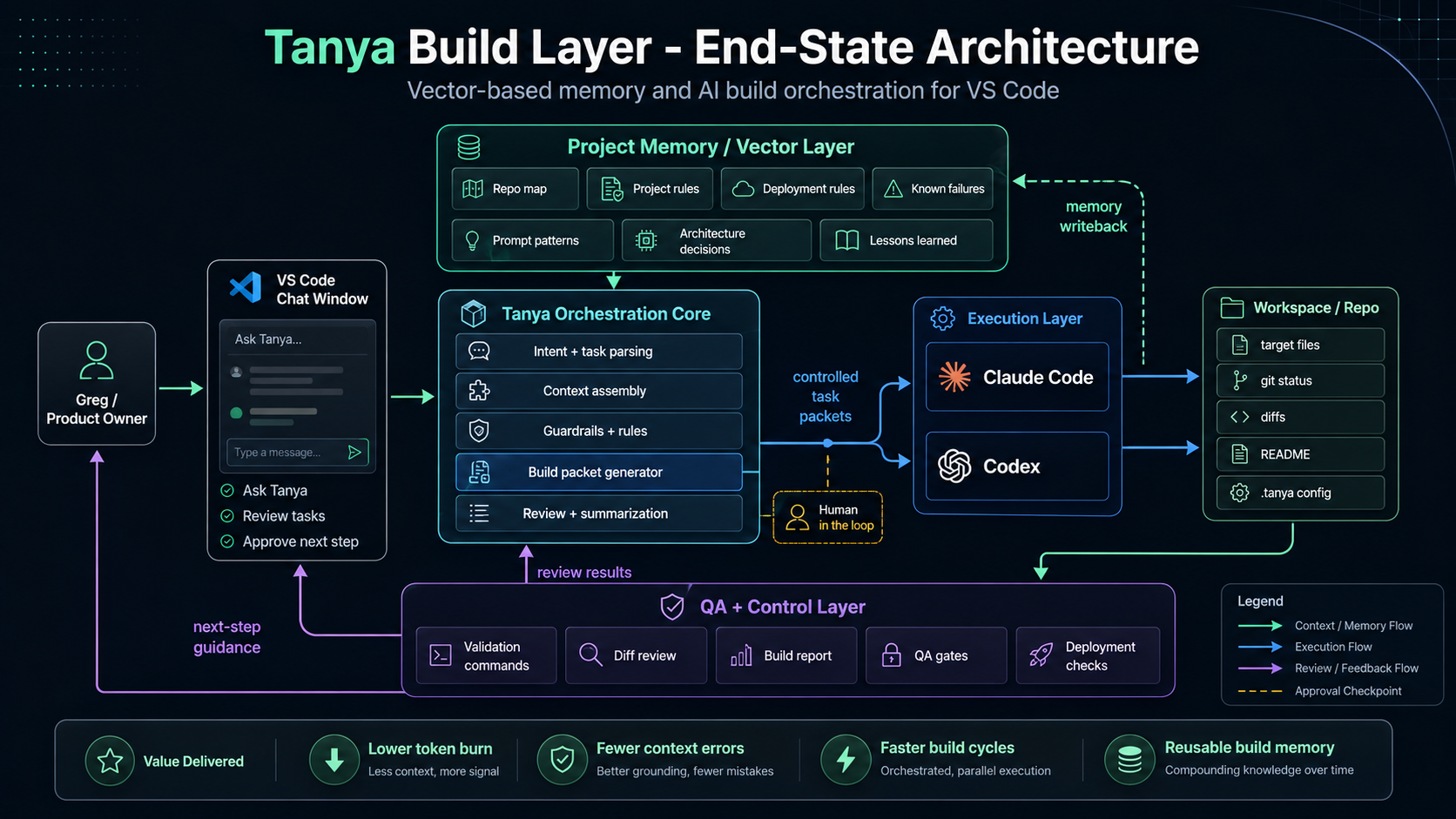
Input
Greg + current objective
Human direction, product judgement, and delivery priority.
Memory
Project memory + retrieval
Previous decisions, accepted patterns, and known risks are pulled in before generation.
Execution
Specialist build loops
Architecture, build, review, security, documentation, and QA run as separate passes with explicit milestone evidence.
Learning
Pattern library updated
The next build starts smarter because the previous build left evidence, run logs, and review notes behind.
How it works
A consistent session pattern across every build.
Retrieve before generating
Session opens by loading project memory, current state, previous decisions, known defects, and reusable patterns. The AI is grounded before it starts producing output.
Confirm the build packet
The task is reduced to one scoped implementation packet with explicit files, constraints, acceptance criteria, and stop conditions. The packet controls the work.
Run the right loop
Architecture, implementation, review, security, documentation, and learning are separated. The AI works in the correct mode instead of trying to do everything at once.
Gate the result
The output is checked against the acceptance criteria. Review looks for drift, unnecessary complexity, missing tests, dependency risk, and mismatches with the project memory.
Update the learning layer
The session closes by recording what changed, what passed, what failed, and what should become reusable. The next session begins with stronger memory.
Tanya v5 loop engine
The cockpit now tracks the delivery loop, not just the task.
Tanya v5 adds a governed loop foundation: mission state, allowed files, protected files, stop conditions, review requirements, human approval gates, and a read-only cockpit view. The goal is not hidden autonomy. The goal is controlled progression through visible engineering milestones.
01
Repo Audit
Understand the current state before creating work.
02
Mission Definition
Define scope, allowed files, protected files, and gates.
03
Loop Plan
Create a bounded plan with validation and reporting.
04
Build Packet
Generate the implementation packet before agent work.
05
Agent Implementation
Codex or another builder works inside the packet.
06
Build/Test Verification
Checks prove the change is safe enough to review.
07
Claude Red-Team Review
Claude reviews for drift, risk, claims, and regressions.
08
Human Approval
Greg approves before merge, deploy, or promotion.
09
Documentation / Run Log
Evidence is captured so the next loop starts stronger.
10
Ready for Next Loop
The cockpit resets into the next bounded build cycle.
Senior engineering guardrails
Tanya v5 packets now treat AI coders as powerful but bounded implementation agents. The senior layer reinforces no unnecessary refactors, no protected-file changes, no secrets, no deployment without approval, evidence-based reports, and explicit Claude review notes.
Build loops
One build. Multiple specialist loops. One shared memory.
Tanya does not depend on one AI trying to solve every part of the delivery lifecycle. It breaks the work into loops that can be run manually, semi-automatically, or eventually orchestrated by the cockpit.
Architecture Loop
Define the solution
Clarifies the problem, chooses the implementation shape, defines constraints, and turns the decision into a build packet.
Implementation Loop
Build within the packet
Writes or changes code only inside the agreed scope. If the packet is wrong, it stops and asks for a decision instead of inventing one.
Review Loop
Find drift and defects
Checks the work against the brief, project memory, acceptance criteria, maintainability, and the wider system.
Security Loop
Protect the delivery surface
Looks for secrets, permissions, dependency risk, exposed endpoints, unsafe automation, and deployment risks before release.
Documentation Loop
Capture the evidence
Updates project memory, decision records, acceptance notes, and stakeholder-readable evidence so knowledge does not disappear.
Learning Loop
Improve the next build
Turns accepted implementations into reusable patterns, recurring defects into QA rules, and successful decisions into future retrieval context.
Pattern credits
Built from practice, informed by emerging agentic engineering patterns.
Tanya is a custom pl8ypus build system, shaped by real delivery pressure across Translation AI, marketing form protection, Campaign Copilot governance review, and build-cockpit work. The v5 loop foundation also credits two public patterns that helped sharpen the direction.
Loop engineering principles
Persistent state, loop budgets, run logs, report-first adoption, and human gates for safer agentic workflows.
Senior pair-programmer guardrails
The idea that AI coders need senior engineering boundaries around scope, security, backend choices, tests, and release discipline.
Tanya does not copy these systems. It absorbs the useful ideas into a domain-specific AI engineering cockpit for enterprise marketing automation builds, with Greg retaining final approval over merge and deployment.
The next evolution
From cockpit to continuous delivery intelligence.
The cockpit starts as a disciplined manual workflow. The future plan is not to remove human judgement. It is to automate coordination, retrieval, evidence capture, and repeatable delivery steps so humans spend more time on real decisions and less time rediscovering work already solved.
Today
Tanya v5 loop foundation
Structured prompts, build packets, 10-stage milestones, read-only loop visibility, QA gates, and manual human approval.
Next
Persistent vector memory
Retrieval before generation, cross-project context, and better session grounding.
Then
Pattern library
Successful implementations become reusable modules and future build guidance.
After
Project profiles
Translation AI, Campaign Copilot, Turnstile, Audience Finder, and future products inherit shared loop rules with local constraints, so enterprise review, team build handoff, and human approval stay visible.
Future
Autonomous coordination
The cockpit routes work, checks outputs, updates memory, and surfaces risk while humans approve priorities and deployment.
Evidence / Governance
The scaffolding that makes AI-assisted builds production-shaped.
Tanya is not trying to replace developers. It is trying to remove the chaos that prevents developers from doing their best work: missing context, undocumented decisions, repeated defects, unclear scope, and delivery knowledge that disappears at the end of a session.
Repeatability beats session luck
Without a cockpit, AI-assisted work depends on the quality of the prompt in the moment. With Tanya, every session has memory, scope, role, and acceptance criteria.
Memory prevents knowledge decay
The system captures decisions when they happen, not weeks later when nobody remembers why the implementation looks the way it does.
Build loops reduce burnout
Developers should not have to repeatedly translate unclear process into reliable delivery. The cockpit moves that structure upstream.
Learning compounds over time
Every successful build adds to the pattern library. Every review improves the next implementation. Every mistake can become a future QA rule.
Greg's take
The first mistake people make is believing AI changes software development. It does not. It exposes everything that was already broken.
Every undocumented decision. Every missing acceptance criterion. Every architectural shortcut. Every dependency somebody forgot to mention. AI simply moves fast enough that those problems compound before anyone notices.
So I stopped attacking bugs. I started attacking the reasons they existed. Every manual decision became a candidate for structure. Every repeated explanation became memory. Every recurring bug became a QA gate. Every successful build became another reusable pattern.
That is where Tanya is going. Not autonomous coding for the sake of it. Governed coordination. Specialist AI loops working from shared memory, checking each other, leaving evidence behind, and improving the next build without removing human responsibility.
The goal is not bigger prompts. The goal is making every build slightly better than the last one.
Next evolution
Capabilities shown by this build.
AI collaboration
- Structured prompt design for complex multi-session builds
- Persistent context management across AI sessions
- Agent role separation to maintain phase focus
Build discipline
- QA gates with defined acceptance criteria, Claude red-team review, and human approval before marking work complete
- Scoped implementation packets with allowed files, protected files, stop conditions, and senior guardrails
- Consistent session rhythm that works regardless of session length
Enterprise readiness
- Transferable patterns for customer environments
- Auditable artifacts: memory, acceptance reports, and decision records
- Stakeholder-readable evidence without requiring developer access
Delivery model
- Shows mature AI collaboration methodology, not just tool use
- Supports manual, semi-automated, and future orchestrated modes
- Keeps human approval gates around milestone advancement, merge, architecture, and deployment
Continuous learning
- Build loops that turn delivery into a learning system
- Pattern libraries that grow from accepted implementations
- Recurring issues become permanent QA rules
Future orchestration
- Multi-agent routing across specialist roles
- Retrieval-based implementation before generation
- Technical debt surfaced before it becomes delivery failure
Every build should teach the next build.
Tanya is the AI engineering method behind pl8ypus: structured delivery, shared memory, loop milestones, senior guardrails, Claude red-team review, QA evidence, and continuous learning.