Build 03 / Governed Campaign Orchestration
Campaign Copilot
A deployed governed campaign intake and orchestration layer for enterprise marketing operations. It turns fragmented requests into controlled decisions, Salesforce campaign creation with returned Campaign ID, Clarevine tracking, DAM image destination URLs, Workfront tickets, design briefs, generated build instructions, and a separate human-reviewed Pardot asset build workflow.
Greg's take
I decided to attack myself.
Not the client. Not the tools. I looked at the delivery chain and admitted the weak link was the way marketing work entered the system: loose briefs, inconsistent naming, guessed tracking, and build teams forced to infer intent.
A rushed intake becomes an unclear brief. An unclear brief becomes a bad asset name. A bad asset name becomes a broken report. Then the developer gets blamed for a system that was already unstable.
So I attacked the system from inside. Every failure point becomes a question, a dropdown, a required decision, a generated name, a tracking link, a DAM destination URL, a build instruction, a QA gate, or an evidence trail.
The idea is simple: remove the places where campaign delivery fails before the campaign reaches production, and protect the people who have been carrying the failure manually.
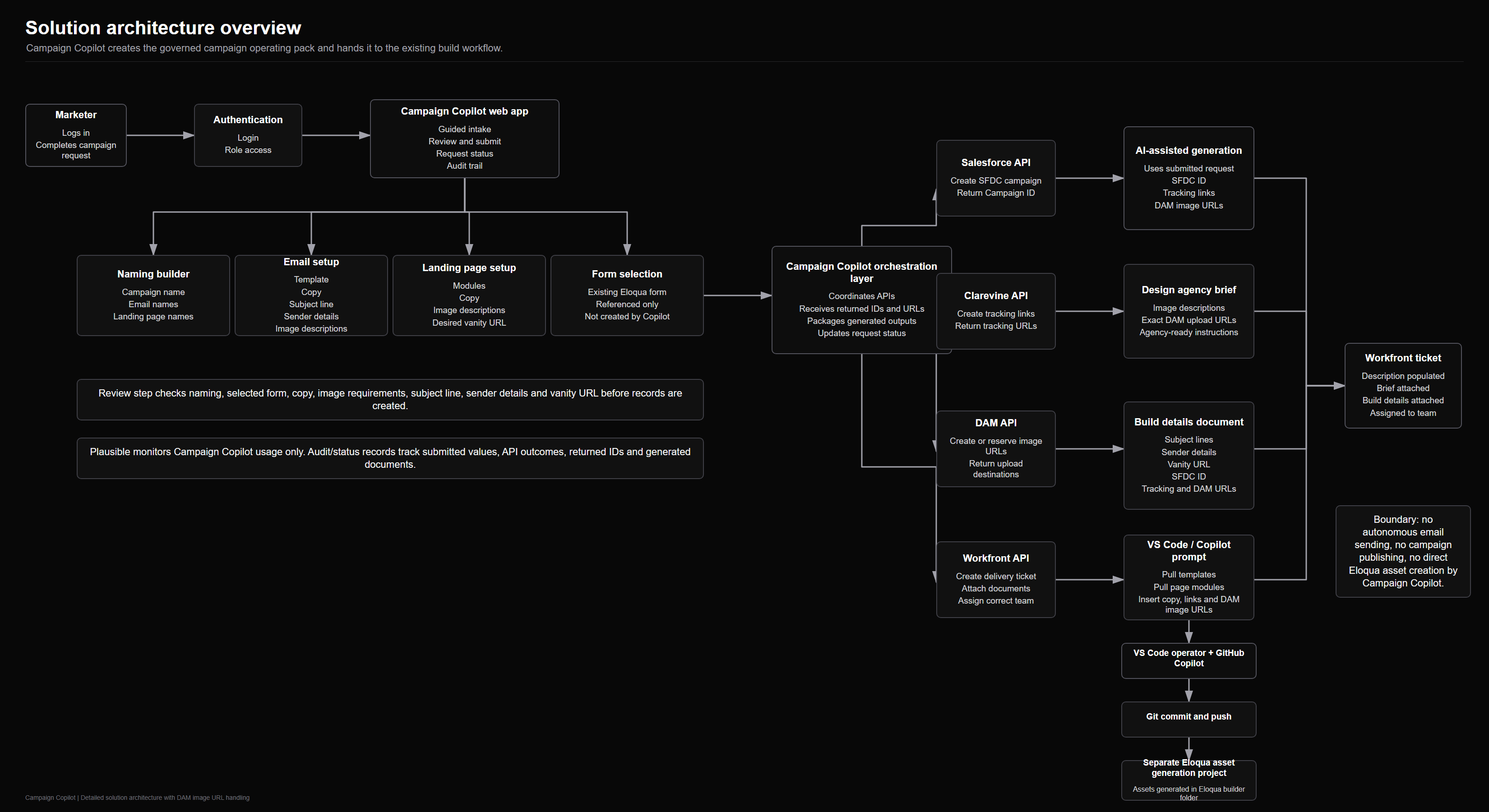
Solution architecture
A governed orchestration layer between intake and delivery.
Campaign Copilot captures the marketer's campaign requirements, creates the Salesforce campaign, receives the returned Campaign ID, generates Clarevine tracking, creates or reserves DAM image destination URLs, packages the creative brief and build instructions, and opens the Workfront ticket with team routing. The integration APIs for those orchestration steps have been built. The separate Pardot build and publishing workflow still handles asset creation, QA, approval, and launch control.
Build milestones
Deployment maturity checkpoints.
Campaign Intake Structure
The intake flow turns fragmented campaign requests into structured decisions.
Asset Naming Logic
Naming rules now generate consistent downstream asset instructions.
Playwright QA Path
Browser-level verification covered the governed intake and campaign package flow.
In-Flight Change Control
Change-control handling is part of the built workflow for preserving the evidence trail when campaign details move.
Client-Specific Delivery Profiles
Further profiles can adapt intake, naming, and handoff rules for another client stack.
The problem
Some campaign delivery environments are fragmented by design.
Requests arrive in pieces
Landing page needs, form type, copy, image direction, email selection, tracking, deadlines, and stakeholder notes arrive across calls, documents, chats, and agency briefs.
Naming conventions are fragile
Asset names depend on humans remembering the right structure. One missed market, campaign code, date, offer type, or channel value creates downstream confusion.
Creative and MA handoff split apart
The design agency needs clear image instructions and upload locations. The MA developer needs build instructions, template choices, tracking links, and final asset names.
Tracking is too manual
Links need Clarevine tracking appended consistently across email and landing page journeys. Manual append work creates avoidable mistakes close to launch.
What it does / system view
A guided intake layer that becomes a governed build package.
Campaign Copilot forces the campaign request into a governed path. The marketer logs in, selects naming convention values, chooses email templates, enters copy, subject line, sender details, image descriptions, landing page modules, landing page copy, the existing Pardot form or form reference, and the desired vanity URL.
The system then sits between the marketer request, Salesforce, Clarevine, DAM, Workfront, the design agency, and the separate Pardot build workflow. It controls the order of operations and turns every selection into downstream build artifacts for human-reviewed delivery.
Guided dropdown intake
Client-specific dropdowns capture region, business unit, campaign type, product family, audience, language, channel, offer, form choice, landing page modules, and email selection.
Naming convention engine
Selected values create approved names for landing pages, emails, image folders, Workfront requests, DAM destinations, and the downstream Pardot build package.
Content and module capture
The marketer supplies landing page copy, email copy, subject line, sender details, CTA, image direction, link destinations, and the desired vanity URL.
Agency and DAM handoff
DAM image destination URLs are created or reserved and included in the agency brief and build instructions so creative files land in the correct destination.
Salesforce and Clarevine setup
The Salesforce campaign is created, the Campaign ID comes back, and Clarevine tracking links are generated with the campaign context.
Workfront and build instructions
The Workfront ticket carries the campaign documents, creative brief, DAM URLs, and generated build instructions into the separate Pardot build workflow.
01 Intake
Dropdown decisions
Structured questions replace open-ended briefing chaos.
02 Name
Asset names
All names are created under the agreed convention.
03 Campaign
Campaign ID
The Salesforce API creates the campaign and returns the Campaign ID.
04 Track
Clarevine links
Tracking links are generated with the campaign context.
05 Handoff
DAM and briefs
DAM URLs, creative instructions, and build details are packaged.
06 Build
Workfront prompt
The ticket carries the Copilot prompt into the existing build pipeline.
Design workflow
The design agency gets a complete creative request, not a vague brief.
Campaign Copilot captures the same instructions the marketer would normally send to the design agency, but forces them into a usable format before the request leaves the system.
Landing page design brief
The marketer chooses landing page modules from approved options, enters the vanity URL, title, meta description, page copy, CTA, and the image direction required for the selected layout.
Email design brief
The marketer selects which email templates are needed, enters subject line, sender details, copy, and link destinations, then provides image instructions for each email module instead of sending loose notes later.
Image instruction capture
Hero image, body image, thumbnail, banner, product visual, and social crop instructions are captured against the exact asset and module they belong to.
DAM upload destinations
The system creates or reserves DAM image destination URLs and gives the agency a clean upload map: which graphic goes where, under what name, and which email or landing page module will consume it.
Agency request package
On submit, the design agency receives one structured request containing asset names, template choices, image requirements, copy context, deadlines, and DAM upload links.
Build-ready destinations
The MA build can start with known image destinations because the DAM URLs are included in both the agency brief and the email and landing page build instructions.
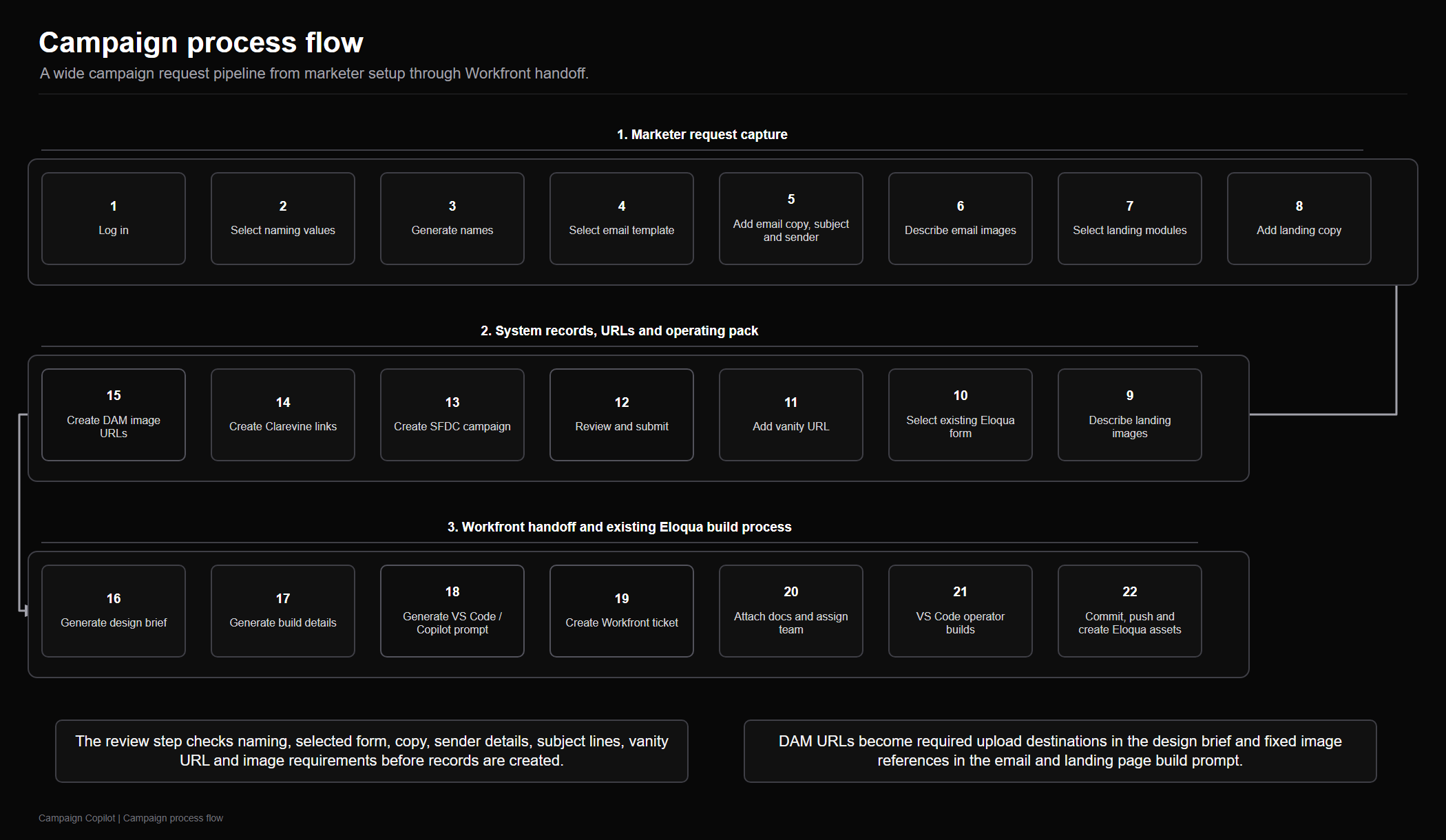
Campaign process flow
Submission becomes a complete delivery package.
On submit, Campaign Copilot creates the Salesforce campaign through the Salesforce API, receives the returned Campaign ID, creates Clarevine tracking links, creates or reserves DAM image destination URLs, attaches the creative brief and campaign build details document to Workfront, assigns the ticket to the right delivery team, and generates the build instructions used by the separate Pardot workflow. The integration APIs for this orchestration have been built.
How it works
The guided request becomes the build instruction.
Answer structured campaign questions
The marketer logs in and chooses controlled naming values instead of writing a vague brief. Required fields force decisions before the request can be submitted.
Capture content and build choices
The marketer chooses email templates, enters email copy, subject line, sender details, image descriptions, landing page modules, landing page copy, the existing Pardot form or form reference, and the desired vanity URL.
Create the Salesforce campaign
Campaign Copilot creates the campaign through the Salesforce API and receives the Campaign ID used by the downstream package.
Generate tracking and DAM destinations
The Clarevine API creates tracking links, and Campaign Copilot creates or reserves DAM image destination URLs for agency upload and Pardot build instructions.
Create the Workfront ticket
The system attaches the design brief and campaign build details document, includes the DAM URLs where needed, and assigns the ticket to the correct delivery team.
Generate the build instructions
Campaign Copilot creates generated build instructions that feed the established Pardot build workflow rather than bypassing it.
Review, build, test, approve
Pardot asset creation remains in the separate build workflow, with human QA, approval, launch control, and existing governance still in place.
Integration model
Campaign Copilot does not replace the stack. It controls it.
The value is not another disconnected AI tool. The value is a control layer that knows how the client already delivers campaigns and turns that messy process into a repeatable workflow.
Salesforce
Campaign creation
The Salesforce API creates the campaign and returns the Campaign ID for tracking, briefs, and build context.
DAM
Image destination URLs
The design agency receives the creative request with the exact created or reserved upload destinations for landing page and email graphics.
Clarevine
Tracking link generation
The Clarevine API creates required tracking links using the campaign context before the build reaches the MA developer.
Workfront
Ticket and team routing
The ticket receives the creative brief, build details document, and generated build instructions, then routes to the correct delivery team.
Where else it can connect
The model maps to another client's stack without pretending every connector is already deployed.
The deployed Campaign Copilot story is tied to Salesforce, Clarevine, DAM destinations, Workfront, and a separate Pardot build workflow. The same controlled intake, naming, orchestration, evidence trail, and human approval model can be adapted to Salesforce Marketing Cloud, HubSpot, Marketo Engage, Eloqua, Braze, or another marketing automation system; Jira or ServiceNow for work management; Bynder or another DAM; and alternative tracking systems. Those are adaptable integration targets, not claimed deployed integrations, unless a client build provides that evidence.
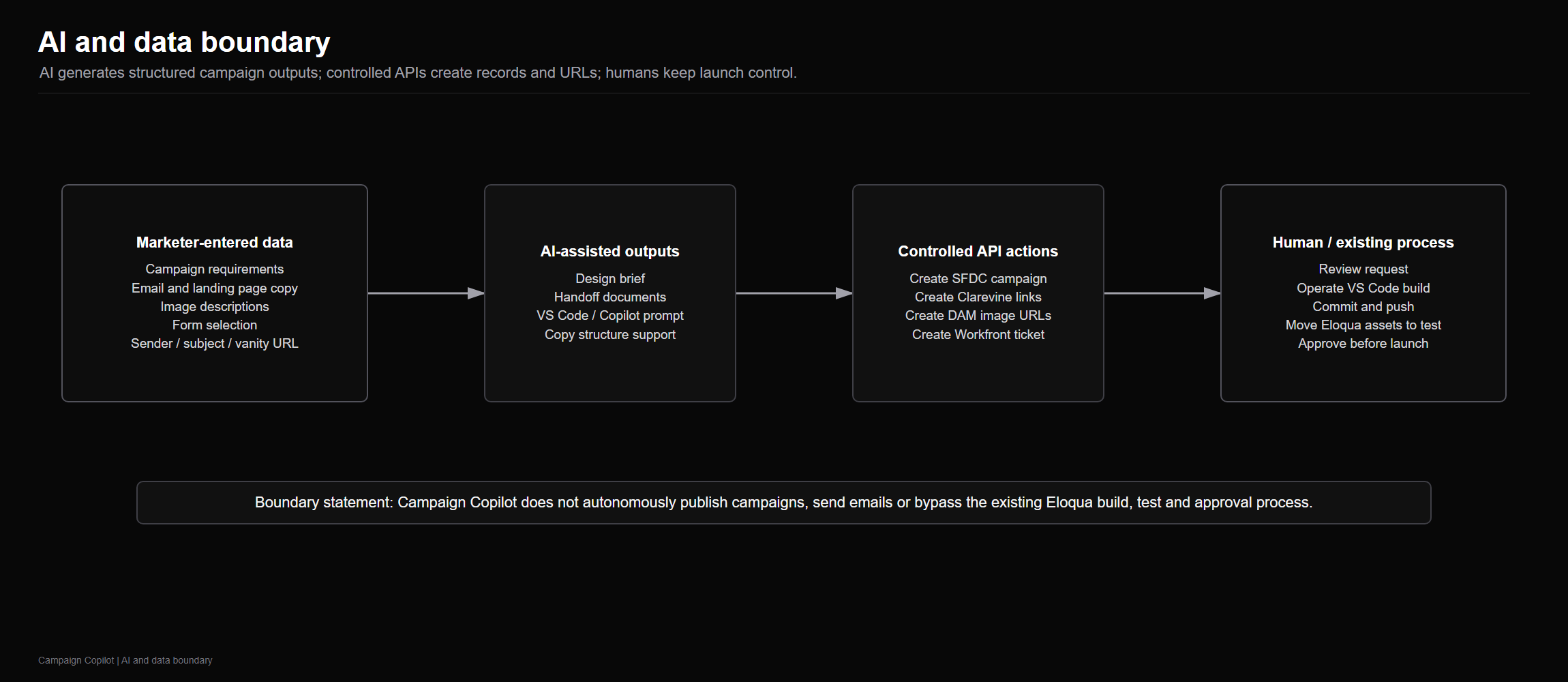
Governance boundary
Campaign Copilot prepares the work. It does not publish the campaign.
The control model is deliberately bounded. Campaign Copilot does not autonomously send emails, publish campaigns, or directly create Pardot assets. Pardot asset build remains a separate workflow, and human QA, approval, launch control, and existing governance stay in place.
No autonomous sends
Campaign Copilot produces the governed package, not the final campaign send.
No direct Pardot asset creation
The Pardot build remains in the established human-controlled workflow.
Human review remains
Existing build, test, approval, and launch governance continue to apply.
Evidence / Governance
The system removes the places where campaign delivery fails.
This is not AI content generation dressed up as automation. It is campaign operations surgery. Every repeatable decision becomes structured. Every naming rule becomes generated. Every handoff becomes a packet. Every link becomes tracked. Every build instruction enters the separate delivery workflow with review still intact.
Less interpretation
The MA developer receives complete build instructions instead of a pile of partial notes.
Cleaner creative handoff
The agency gets the image brief and the correct DAM upload destinations at the same time.
Fewer tracking mistakes
Clarevine tracking is generated with the Salesforce Campaign ID before the email build reaches QA.
More controlled automation
The generated build instructions can accelerate template work, but approval stays with the MA developer before the separate Pardot workflow creates assets.
Enterprise deployment evidence
Capabilities shown by this build.
Campaign operations
- Client-specific intake design for fragmented delivery environments
- Asset naming convention automation
- Landing page module, existing form, email, and creative handoff orchestration
Integration thinking
- Salesforce campaign creation and Campaign ID capture
- DAM image destination URLs for agency uploads
- Clarevine tracking link generation with campaign context
Build workflow support
- Workfront ticket creation and delivery team routing
- Design brief and campaign build details attached to the ticket
- Generated build instructions for the separate Pardot workflow
Control model
- AI-assisted, not blind autonomous delivery
- No autonomous email sends, campaign publishing, or direct Pardot asset creation
- Evidence trail from request to reviewed build package
Want to remove the weak points from campaign delivery?
Campaign Copilot is designed for enterprise marketing teams that need cleaner intake, naming discipline, creative handoff, tracking control, generated build instructions, and a portable evidence trail without surrendering human approval or bypassing the marketing automation build workflow.